Your own comp rules
Your comp rules decide which sold homes count as comps. Set them once for the whole workspace, then change them for any lead that needs something different.
What it is
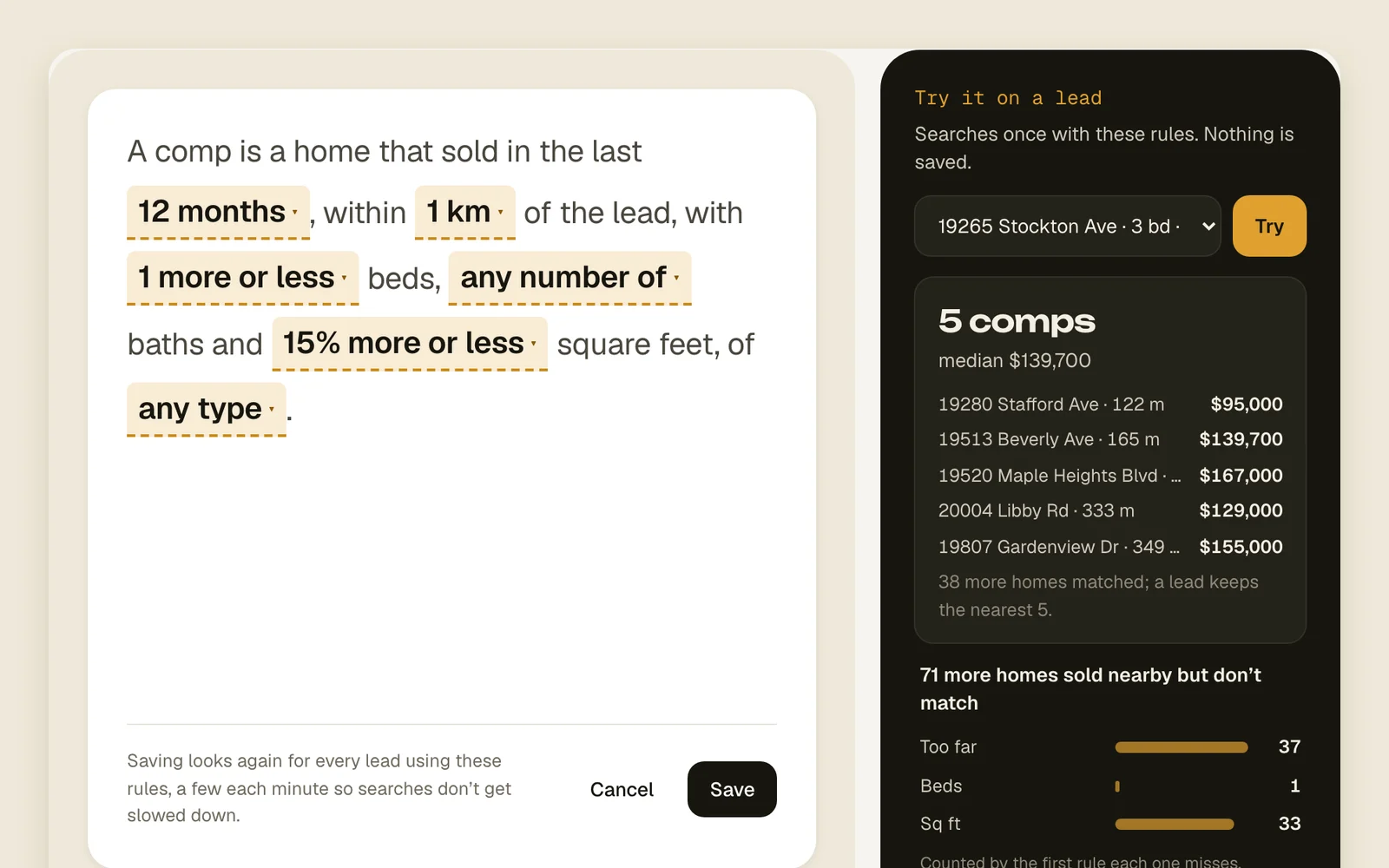
The rules read as one sentence: “A comp is a home that sold in the last 6 months, within 500 m of the lead, with the same beds, the same baths and 15% more or less square feet, of any type.” Each bold part is a blank you tap to change.
The workspace's rules cover every lead. A lead can have its own rules instead, which change nothing for other leads.
How to set the workspace's rules
Only the workspace owner can change the workspace's rules. Anyone can change one lead's rules.
- 1
Open Manage › Comps
You'll see the rules as a sentence.
ManageComps - 2
How recent
Tap the months and pick how long ago a comp may have sold.
3 months6 months12 months2 years - 3
How far
Tap the distance and pick how far from the lead a comp may be.
250 m500 m1 km2 km5 km - 4
How similar
Tap beds and baths, then square feet. Same or fewer keeps homes no bigger than the lead.
SameSame or fewer1 more or lessAny±10%±15%±20%±30% - 5
Which kinds of home
Tap the home type and pick as many as you like. None picked means any type.
HouseTownhouseCondoMulti-familyManufacturedOther - 6
Try it before you save
In Try it on a lead, pick a lead and press Try. You see how many comps it would get and their median, and how many nearby sales were left out by each rule. Nothing is saved.
Try - 7
Save
Press Save. Every lead using the workspace's rules looks again, a few each minute.
Save
How to change one lead's rules
- 1
Open the lead's Comps tab
Press Edit rules at the bottom.
Edit rules - 2
Pick Only for this lead
Change the sentence the same way. The box under it shows what Acre will look for, with the lead's own beds, baths and square feet filled in.
Workspace rulesOnly for this lead - 3
Save and search again
The lead looks again right away with its new rules. To go back, open it again, pick Workspace rules and save.
Save and search again
Good to know
- Distances are in meters and kilometers: 500 m is about a third of a mile.
- A lead with its own rules keeps them when the workspace's rules change.
- In Try it, each home left out is counted once, by the first rule it misses.
- If the lead has no beds, baths or square feet on record, that rule is skipped for it.
- Tighter rules mean better matches but fewer of them. The numbers need at least 3 comps, so loosen one rule at a time.
- Try it only lists leads that are on the map.