Buy boxes
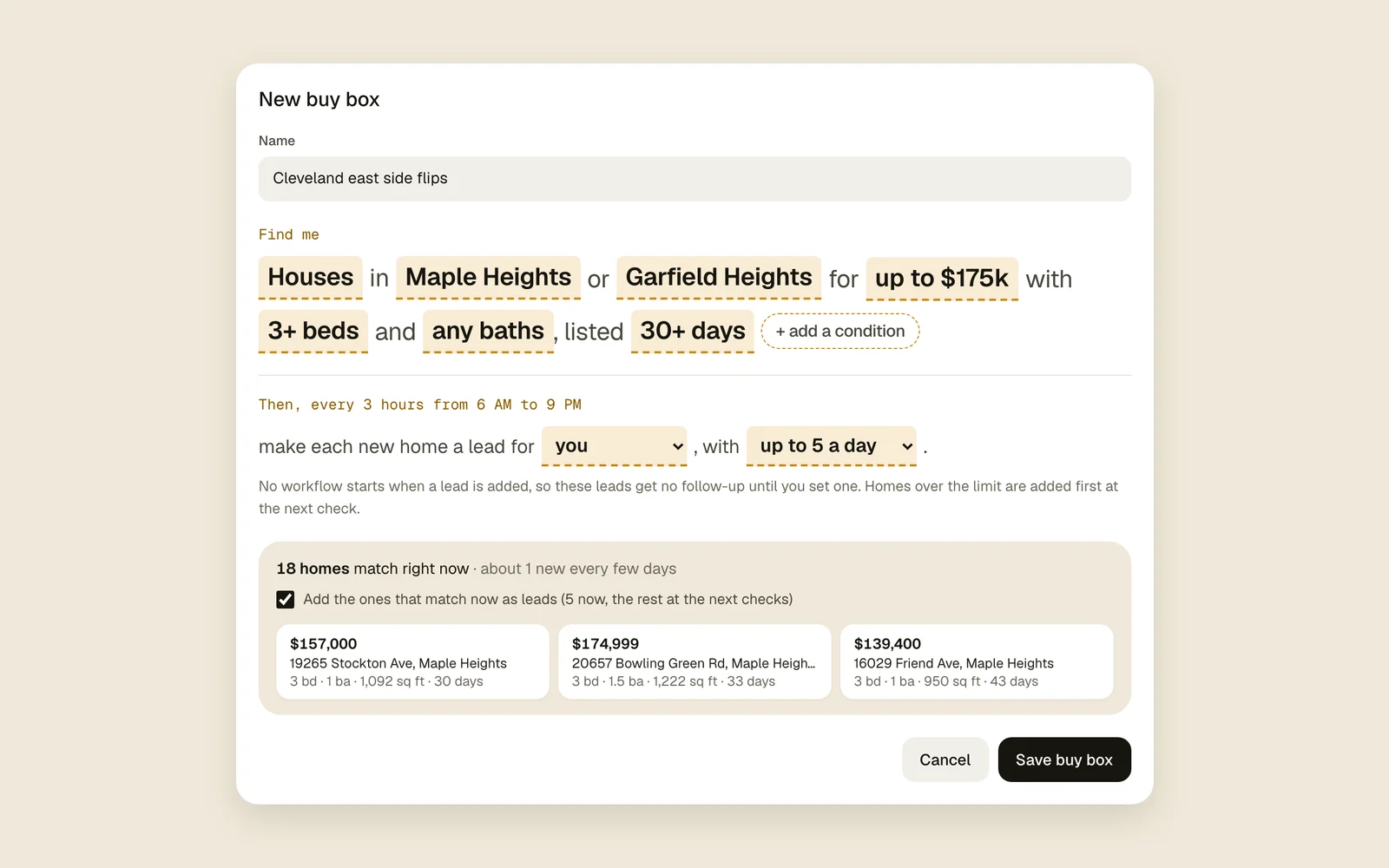
A buy box is a saved search written the way you’d say it: “Houses in Garfield Heights for up to $175k with 3+ beds.” Acre checks it every 3 hours, and every new listing that fits becomes a lead.
On this page
How it works
Each check reads the homes for sale in the places you picked and keeps the ones that fit every part of your sentence. New matches become leads for the person you choose, and they get a push like “4 new deals from Pittsburgh flips”.
On each lead it adds, a Found by card says which buy box found it and Why it matched: each rule next to what the home has. Each buy box’s card in Manage shows its new leads over the last 14 days, what it found today, and how many it has found, contacted and made offers on.
Make a buy box
- 1
Start a new one
Go to Manage › Buy boxes and press New buy box. Give it a name you’ll recognize, like “Pittsburgh flips”.
- 2
Pick your places
Tap pick a place and search for a city, ZIP code, neighborhood or county. Add up to 20.
CityZIPNeighborhoodCounty - 3
Say what you buy
Tap each highlighted part of the sentence to change it: the home type, price, beds and baths. + add a condition adds more.
Days on the marketDescription mentionsPrice cutSizeYear builtHOALot sizeDescription doesn't mention - 4
Choose who gets the leads
Under Then, every 3 hours from 6 AM to 9 PM, pick who each new lead goes to and, if you want, a daily limit.
- 5
Check the count and save
The box below shows how many homes match right now, about how many new ones a day, and a few examples. Add the ones that match now as leads starts ticked, so those come in too; untick it to skip them. Then press Save buy box.
Save buy box
Tips
Good to know
- It only adds homes for sale right now: not coming soon, pending or under contract.
- A home missing something your buy box asks about (no square feet on record, say) is skipped, since Acre can’t tell if it fits.
- Untick Add the ones that match now as leads and only homes listed after you save become leads.
- Checks run at 6 AM, 9 AM, noon, 3 PM, 6 PM and 9 PM, in the time zone of whoever saved the buy box.
- Turn a paused buy box back on and it skips the homes listed while it was off.
- A home already a lead in your workspace is never added again.
- Under Then, every 3 hours…, make each new home a lead for can be no one. Those leads have no owner and nobody gets a notification about them; find them in Leads.
- With teammates, pick the least busy teammate there instead. Each new lead goes to whoever has the fewest open leads (not archived or sold) at that moment, counting the ones just handed out, and each person is told about theirs.
- A workspace can have 5 buy boxes. Anyone can make one; only whoever made it, or a workspace owner, can change, pause or delete it.
- Your plan’s new leads a day still count. Matches over the limit come in at later checks, as it makes room.
- Its leads join your workflows that start when a lead is added, and the builder names them. New lead nudges leaves buy-box leads out.
- Deleting a buy box stops it. The leads it found stay in Leads.